If you are hunting for an iLovePDF alternative, you have probably hit a daily limit, a watermark, or a sign-in prompt in the middle of something. This is an honest three-way comparison of iLovePDF, Smallpdf and PDFLove – and you should know up front that we make the third one.
Rather than declare ourselves the winner, this sets out how the three actually differ, where the other two are genuinely better, and how to check every claim here for yourself in about a minute.
A Word on Who Wrote This
PDFLove is ours. A comparison of any iLovePDF alternative written by a vendor that hides its stake is worthless, so it is stated plainly here and again wherever it matters.
What makes this useful anyway is that the claims are testable. Every difference described below can be verified in under a minute without taking anyone’s word for it – there is a section at the end telling you exactly how. Read the comparison, then check it.
iLovePDF and Smallpdf are both well-built products with millions of users and years of development behind them. Anyone telling you an iLovePDF alternative is needed because those tools are bad is selling something. They are good. They are built on a different architecture, and that architecture has consequences worth understanding.
Why People Look for an iLovePDF Alternative
The reasons for wanting an iLovePDF alternative are consistent, and knowing which applies to you narrows the choice immediately.
The daily limit
Far and away the commonest. You merge two files, then try a third and are told to wait or subscribe. It arrives at the worst moment, because nobody hits a cap while browsing – they hit it mid-task.
The account wall
Some operations ask you to sign in. For a one-off job that is a disproportionate ask, and it is a frequent trigger for hunting an iLovePDF alternative that simply does the thing.
The upload itself
A smaller group, but the most decided. Somebody realises that a payslip or a passport scan has just been sent to a company’s servers, and wants a tool where that does not happen.
File size ceilings
Free tiers cap the size of what you can process. Ironically the documents most likely to need compressing are the ones most likely to exceed the limit for compressing them.
Speed on a slow connection
Server processing means uploading the whole file and downloading the result. On a poor connection a 40 MB document takes minutes before any work begins. On-device tools skip both transfers entirely.
Match your reason to the list and the decision is usually obvious – the first four all point the same way, the fifth depends on your machine.
The One Difference That Drives Everything
Almost every practical difference between iLovePDF and any iLovePDF alternative follows from a single technical choice: where the work happens.
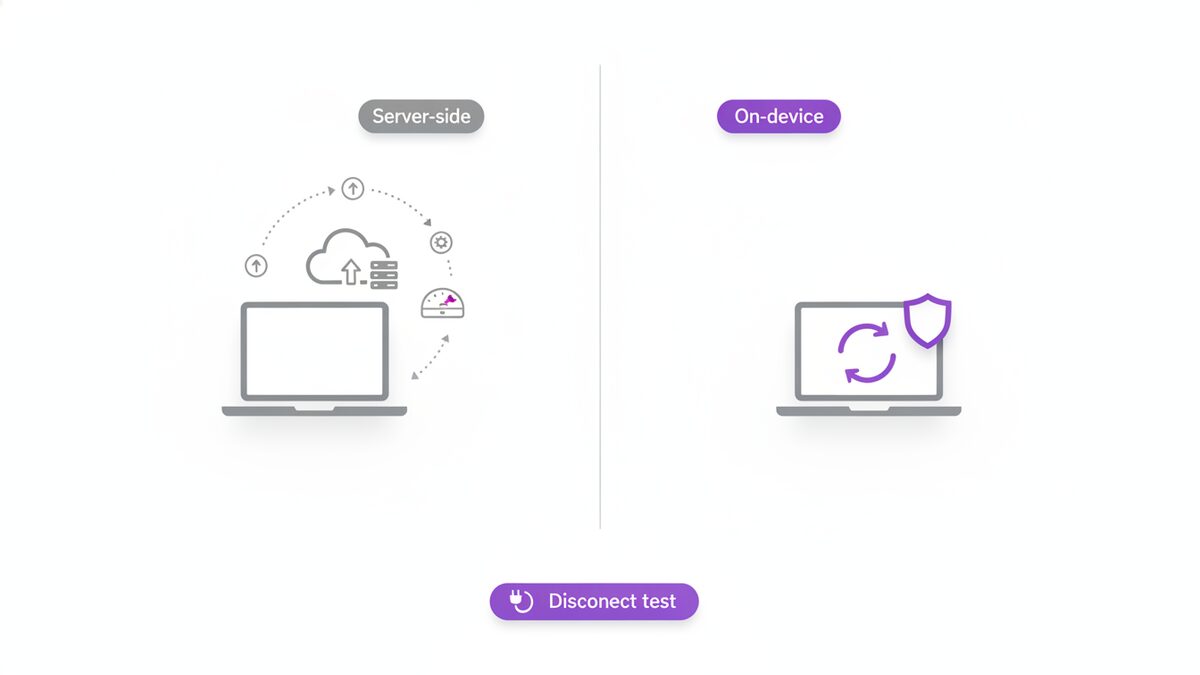
Server-side processing. Your file is uploaded, the operation runs on the company’s machines, and the result is sent back. This is how iLovePDF and Smallpdf work, and it is how most online PDF tools work.
On-device processing. The work happens inside your browser using your own computer. Nothing is transmitted. This is how PDFLove works.
That choice determines the limits, the pricing, the privacy position and even which features are possible. Understanding it means you can predict how any tool in this category will behave without reading its marketing.
iLovePDF Itself
Best for: a wide toolset with desktop and mobile apps alongside the website.
The tool most people are leaving when they seek an iLovePDF alternative covers a large range of operations and has built out beyond the browser into installable applications and an API. The interface is clear, the output is reliable, and for occasional use the free tier handles a lot.
The constraints are the ones that send people looking for an iLovePDF alternative: free usage is capped, some operations want an account, and larger or more frequent jobs push you towards a subscription. Files are uploaded for processing, and the company deletes them after a period described in its policy.
Our fuller write-up is on the iLovePDF comparison page.
Smallpdf
Best for: polish, and teams that want one account across a workflow. The most designed iLovePDF alternative of the three.
Smallpdf is the most designed of the three. The interface is genuinely pleasant, the conversions are strong – particularly to and from Office formats – and it integrates with cloud storage in a way that suits people whose documents already live there. It also has proper team features, which neither of the others matches.
The constraints are similar in shape: a limited number of free operations before you are asked to sign up or subscribe, and server-side processing for everything. If you want an iLovePDF alternative because of the daily cap, you will meet a comparable one here.
PDFLove
Best for: unlimited free use and keeping documents on your own machine – an iLovePDF alternative built on a different architecture entirely.
Ours, so weigh this iLovePDF alternative accordingly. Every tool runs inside the browser on your device. There is no account, no watermark, no page limit and no daily cap, because there is no per-file server cost to recover.
Where the others are better. There is no cloud sync, because there is no cloud – files do not follow you between devices. There is no team management or shared workspace. There is no API. And very large files are limited by your own machine’s memory rather than by a server farm, so a several-hundred-megabyte document may struggle where a server-based service would not.
If those matter to you, one of the other two is the better product, and that is a straight answer rather than false modesty.
Why Free Tiers Have Limits at All
This is worth understanding before choosing any iLovePDF alternative, because it explains the whole category and it is not a matter of generosity.
When processing runs on a company’s servers, every conversion costs them CPU time, memory, bandwidth and storage. A free user with no cap is a direct, unbounded expense. So the free tier is metered – two files a day, a page ceiling, a size limit – and the meter is what converts some users into subscribers. It is a rational model and there is nothing underhand about it.
When processing runs in your browser, the file never reaches a server and costs the developer nothing per use. There is no meter to set, because there is nothing to meter.
So when you compare an iLovePDF alternative on limits, you are not really comparing generosity. You are comparing architecture. Any server-based tool will eventually cap you; any on-device tool has no reason to.
Where Your File Goes: The Real iLovePDF Alternative Test
The part most iLovePDF alternative comparisons skip, and the one that should decide it for some people.
Think about what actually goes through a PDF tool: contracts, invoices, payslips, bank statements, medical letters, scanned passports, signed agreements. It is a fair sample of everything sensitive you own.
With a server-based service, that document is transmitted, written to disk somewhere, processed, and held until a retention window expires. Both iLovePDF and Smallpdf publish policies describing this, and there is no suggestion either does anything improper. The point is structural: the file exists on infrastructure you do not control, and you are trusting a policy.
With on-device processing, there is nothing to trust. The document is never transmitted, so no policy governs it and no breach can expose it. That is the substantive reason to want an iLovePDF alternative, far more than a daily limit.
For most documents it genuinely does not matter. For a passport scan or an employment contract, it might.
Features Compared
Any iLovePDF alternative worth considering covers the everyday operations, and all three here do – merge, split, compress, convert, rotate, page numbers, watermarks, protect, unlock, sign. On core capability there is little to separate them, and any of the three will do the job.
The meaningful differences sit around the edges:
- Daily limits: capped on the two server-based tools, absent on the on-device one.
- Watermarks: generally not applied by any of the three on core operations, though free tiers change over time.
- Account required: sometimes on the first two, never on the third.
- Works offline: only possible with on-device processing.
- Cloud sync and integrations: a real strength of Smallpdf, absent from PDFLove entirely.
- Team features and API: available on the first two, not on PDFLove.
- Desktop and mobile apps: iLovePDF and Smallpdf have them; PDFLove has a scanner app but the PDF tools are browser-only.
- Very large files: a server has more memory than your laptop.
Terms and limits across every iLovePDF alternative change frequently, so treat any comparison including this one as a starting point rather than a specification.
Switching to an iLovePDF Alternative Without Friction
Moving to an iLovePDF alternative is easier than switching installed software, but a few things are worth doing in order.
- List what you actually use. Most people use three operations – merge, compress, and one converter. The feature comparison matters far less once you write your real list down.
- Test on a real document. Not a sample. Your files have the quirks that break things: unusual fonts, scanned pages, forms, hundreds of pages.
- Check the awkward case first. If you have one recurring job that is fiddly, try that before anything else. It is the one that will send you back.
- Retrieve anything stored in the old service. If you have been saving files to a cloud workspace, export them while your account still works.
- Bookmark the specific tool rather than the homepage, so the switch does not cost you three clicks every time.
- Keep the old account for a month if it is a paid one, until you are confident the iLovePDF alternative covers your work.
There is no data lock-in here worth worrying about – your PDFs are files on your disk, not entries in someone’s database. The only thing that can strand you is documents stored in a vendor’s cloud workspace, which is why step four exists.
Three Myths About Browser-Based Tools
Recurring objections to choosing an on-device iLovePDF alternative, and what is actually true.
“Browser tools must be less capable”
This was true several years ago and largely is not now. Modern browsers handle the underlying work directly, and for merging, splitting, compressing, rotating, signing and form filling the output is equivalent. The genuine gaps are elsewhere – large-file capacity, sync, teams – not in the quality of the operation.
“Free must mean the files are the product”
A reasonable instinct, and it is why the architecture matters. If a tool never receives your file, it cannot be monetising it, whatever its business model. That is checkable rather than promised, which is the whole point of the disconnect test.
“On-device means it works offline forever”
Partly. The page has to load once, which needs a connection. After that the tools keep working without one. It is a real advantage on a train or a bad hotel connection, but it is not magic – a first visit still needs the internet.
What none of the three does well
Worth stating, because a comparison that only lists strengths is a sales page. All three share the same real gap: reflowing existing body text inside a designed PDF. None of them does it, and no browser-based iLovePDF alternative does either.
That job needs to reconstruct structure a PDF never stored – which characters formed a sentence, what font they used, how to reflow the rest when your replacement is a different length. It is genuinely difficult, and it is where paid desktop software still earns its price. If that is your daily work, none of the three on this page is your answer.
A note on how fast this ages
Free tiers in this category move constantly. Limits are raised and lowered, features migrate between free and paid, and an account requirement appears or disappears with a redesign. Any published comparison, including this one, starts decaying the day it goes up.
That is precisely why the tests in the next section matter more than the descriptions in this one. A claim about a daily cap may be six months stale; the disconnect test tells you what a tool is doing right now, on the version in front of you. Read comparisons for the shape of the choice, then verify the specifics yourself before committing anything that matters.
How to Check Any of This Yourself
The reason this iLovePDF alternative comparison can be trusted despite who wrote it is that you do not have to trust it.
The disconnect test
Load the tool, then turn off your network connection and try to use it. A tool that processes on your device carries on working. A server-based one stops, because it needs to send your file somewhere. Ten seconds, and it settles the privacy question completely.
The developer tools test
Open your browser’s network panel before running an operation. You will either see your file being uploaded or you will not. This is not something marketing copy can talk its way around.
The limit test
Run the same operation several times in a row. Any daily or hourly cap will announce itself quickly.
The export test
Complete one real task end to end – not a sample file – and check the output for a watermark, a page cap or a sign-in wall at the download step. Most limits appear at the end, not the beginning.
Four tests, five minutes, and any iLovePDF alternative gives up its real behaviour – and you will know more about any iLovePDF alternative than any review can tell you.
Which iLovePDF Alternative to Pick
There is no single best iLovePDF alternative, so here are four honest answers instead of one.
If you want no limits and nothing uploaded, that is what PDFLove is for, and the disconnect test proves it in ten seconds.
If you need cloud sync, team accounts or an API, PDFLove does not have them. Smallpdf is strong on the first two, iLovePDF on the third.
If you want installable desktop and mobile apps, iLovePDF and Smallpdf both offer them.
If you handle genuinely sensitive documents – identity papers, medical records, anything under a confidentiality obligation – the architectural question outweighs the feature list, and on-device processing is the answer regardless of whose it is.
You can read about the open standard all three are built on at Wikipedia’s PDF page, and try the free PDFLove tools without an account.
Frequently Asked Questions
What is the best free iLovePDF alternative?
It depends what pushed you to look. If it was daily limits or an account prompt, an on-device tool such as PDFLove has neither, because nothing is uploaded and there is no per-file cost to recover. If you need cloud sync, team accounts or an API, Smallpdf and iLovePDF are the stronger products.
Are iLovePDF and Smallpdf safe to use?
Both are established products with published privacy policies and no suggestion of anything improper. The structural point is that both process files on their servers, so your document is transmitted and stored until a retention window expires. Whether that matters depends entirely on what the document contains.
Why do free PDF tools limit how much I can do?
Because server-side processing costs the company money for every file – CPU, memory, bandwidth and storage. Metering the free tier controls that cost and converts some users to subscribers. Tools that process in your browser have no per-file cost, so they have nothing to meter.
How can I tell whether a tool uploads my file?
Load it, disconnect from the network, and try to use it. An on-device tool keeps working; a server-based one stops, because it needs to send your file somewhere. You can also watch your browser’s network panel during an operation and see the upload directly.
Is PDFLove better than iLovePDF?
Not universally, and we make PDFLove so treat this carefully. It is better if you want unlimited free use with nothing uploaded. It is worse if you need cloud sync, team management, an API, desktop apps, or the capacity to handle very large files, since browser processing is bounded by your own machine’s memory.
Do any of them add watermarks?
None of the three typically watermark core operations, though free-tier terms change over time across the whole category. The reliable check is to complete one real task end to end and look at the output, since limits usually appear at the download step rather than the start.
Which works offline?
Only on-device processing can. Once the page has loaded, PDFLove continues to work with no connection. Server-based tools cannot, because the operation itself happens elsewhere.
Do I need an account?
PDFLove never asks for one. iLovePDF and Smallpdf both allow some anonymous use and then ask you to sign in for heavier use or particular features, which is a common point at which people start looking for an alternative.
Conclusion
All three do the everyday jobs well, so choosing an iLovePDF alternative is not really a feature decision – it is a decision about architecture, and everything else follows from it.
A server-based iLovePDF alternative gives you cloud sync, team accounts, APIs and the capacity to handle very large files, at the cost of uploading your documents and living with a metered free tier. On-device tools give you no limits and nothing transmitted, at the cost of no sync, no teams and your own machine’s memory as the ceiling.
Neither is universally right. Run the disconnect test on whichever you are considering, decide which trade suits the documents you actually handle, and ignore anyone – us included – who tells you there is one answer. Try PDFLove free, no account required.